Stop Burning Tokens on PDFs: How Microsoft’s MarkItDown MCP Cuts Claude’s Token Usage by up to 70%
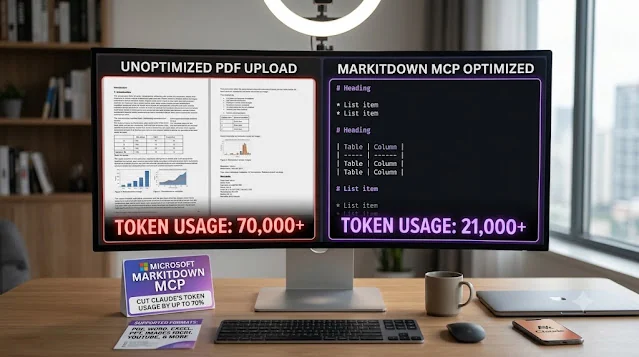
If you use Claude (or any LLM) to analyze documents, you’re probably paying for tokens you never needed to spend. Every time you drop a PDF into a chat, the model has to ingest the entire file — broken table formatting, embedded images, layout artifacts, metadata, and all the noise in between. There’s a cleaner, free way to do this, and it comes from Microsoft.
On this page
- Stop Burning Tokens on PDFs: How Microsoft’s MarkItDown MCP Cuts Claude’s Token Usage by up to 70%
- The Hidden Cost of Uploading PDFs to Claude
- The Fix: MarkItDown
- The Real Power Move: The MarkItDown MCP Server
- Step-by-Step: Connecting MarkItDown MCP to Claude Desktop
- A Few Practical Notes
- The Bottom Line
Tags: Claude, MCP, Productivity
Stop Burning Tokens on PDFs: How Microsoft’s MarkItDown MCP Cuts Claude’s Token Usage by up to 70%
Every PDF you drop into Claude quietly drains your token budget. Here’s the free, open-source fix from Microsoft — and exactly how to wire it into Claude Desktop in five minutes.
If you use Claude (or any LLM) to analyze documents, you’re probably paying for tokens you never needed to spend. Every time you drop a PDF into a chat, the model has to ingest the entire file — broken table formatting, embedded images, layout artifacts, metadata, and all the noise in between. There’s a cleaner, free way to do this, and it comes from Microsoft.
This guide walks through why raw PDFs are so expensive, how Microsoft’s open-source MarkItDown tool fixes it, and exactly how to wire its MCP server into Claude Desktop so every file you upload is automatically converted to clean Markdown before Claude ever reads it.
~70%
Lower Token Usage
152K+
GitHub Stars
Free
Open Source (MIT)
All
Major File Types
The Hidden Cost of Uploading PDFs to Claude
When you upload a PDF, the model doesn’t see a tidy document — it sees a messy serialization of everything inside the file. Mangled tables, image data, multi-column layouts that get scrambled into nonsense, and structural junk all get pushed into the context window.
The result is token bloat. A single PDF page can consume roughly 1,500 to 3,000 tokens depending on its complexity. That means a modest 20-page document can eat up to ~70,000 tokens in one shot — before Claude has produced a single useful word of output.
This matters for three reasons:
- Cost: Tokens are billed. Noise you didn’t need to send is money you didn’t need to spend.
- Context limits: Every token wasted on formatting garbage is a token unavailable for your actual question, your other documents, or Claude’s reasoning.
- Answer quality: Counterintuitively, more raw input can mean worse output. A scrambled table buried in layout noise is harder to reason over than the same table expressed as clean Markdown.
The Fix: MarkItDown
The solution is to convert your files into Markdown before they reach the model — and that’s exactly what MarkItDown does.
MarkItDown is a free, open-source Python utility from Microsoft that takes almost any file and converts it into clean, structured Markdown. It’s purpose-built for LLM pipelines, preserving the document structure that actually matters — headings, lists, tables, links — while stripping the noise. It is an incredible lifesaver for computer engineers and data scientists during the data cleaning phase.
PDF, Word, Excel, PowerPoint, Images (OCR), HTML, CSV / JSON / XML, EPUB, Audio, YouTube URLs
The project’s momentum speaks for itself: the repository has surpassed 152,000 GitHub stars and is depended on by thousands of downstream projects, making it one of the most popular document-conversion tools in the AI ecosystem.
Why Markdown is the right format for LLMs
Mainstream LLMs (like GPT-4o and Claude) were trained on enormous volumes of Markdown-formatted text — so much so that they often produce Markdown unprompted. Markdown sits extremely close to plain text with minimal markup, yet still encodes meaningful document structure — and it’s highly token-efficient as a side benefit.
The Real Power Move: The MarkItDown MCP Server
Once the MarkItDown MCP (Model Context Protocol) server is connected to Claude Desktop, every file you drop into a conversation is automatically converted to Markdown behind the scenes — before Claude processes it. No manual conversion step, no separate terminal command. You upload a PDF; Claude receives clean Markdown.
Step-by-Step: Connecting MarkItDown MCP to Claude Desktop
Download it from python.org and run the installer. On Windows, make sure to check the “Add Python to PATH” box during installation — this is the most common setup mistake.
macOS / Linux: open the Terminal app.
Windows: open Command Prompt or PowerShell.
MarkItDown’s MCP server runs cleanly via uv, a fast Python package manager. Paste the command for your OS and press Enter.
macOS / Linuxcurl -LsSf https://astral.sh/uv/install.sh | sh
Windows · PowerShellpowershell -c "irm https://astral.sh/uv/install.ps1 | iex"
From the Claude menu (top-left), open Settings, then select the Developer tab in the sidebar.
Click Edit Config, then paste the following into claude_desktop_config.json.
claude_desktop_config.json{
"mcpServers": {
"markitdown": {
"command": "uvx",
"args": ["markitdown-mcp"]
}
}
}
Don’t just close the window — quit the application completely and relaunch it so Claude detects the new MCP server. (On macOS, use Cmd+Q; on Windows, right-click the tray icon and choose Exit.)
Drop a PDF or Word file into a new conversation. MarkItDown converts it to clean Markdown before Claude reads it. That’s the whole workflow.
A Few Practical Notes
For scanned PDFs or image-heavy documents, plain text extraction has limits — there’s no text layer to pull from. In those cases, MarkItDown offers optional OCR via plugins and can integrate with Azure Document Intelligence or Azure Content Understanding for higher-fidelity extraction.
| Capability | Built-in (Free, Local) | Azure Content Understanding |
|---|---|---|
| Document conversion | Offline, format-specific | Cloud multimodal extraction |
| Scanned PDFs / OCR | Plugin-based | High-quality cloud OCR |
| Audio & video | Basic audio only | Full audio + video |
| Cost | Local compute only | Billable Azure API calls |
MarkItDown is also intentionally optimized for machine consumption, not pixel-perfect human reproduction. It preserves structure and content for LLM reasoning; it’s not a tool for producing print-ready document copies. For feeding documents to Claude, that tradeoff is exactly what you want.
The Bottom Line
Uploading raw PDFs to Claude is a quiet, recurring tax on your token budget — and often on your answer quality too. Microsoft’s MarkItDown removes both problems at once: it’s free, open source, supports nearly every file type you’ll throw at it, and converts documents into the clean Markdown that LLMs were practically built to read.
Wire up the MCP server once, and every file you upload from then on arrives at Claude pre-cleaned — leaner context, lower cost, and better answers. It’s one of the highest-leverage five-minute setups in any serious Claude workflow.
No comments yet. Be the first.